Better gate control with the world’s only Bluetooth smart padlock with an integrated keypad
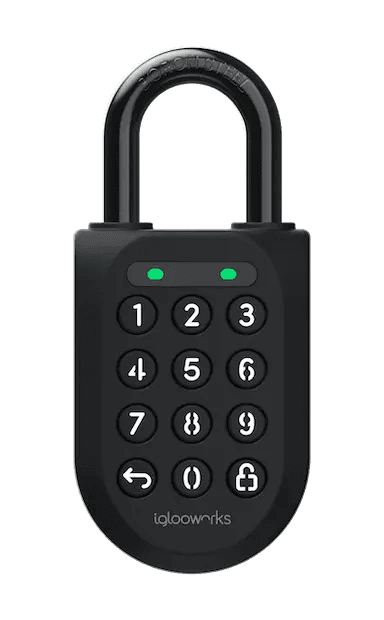
In conjunction with world smart access control leader, Igloo Co, we bring you the S2E smart Enterprise padlock. With a combination of Bluetooth technology combined with Igloo’s patented OTP technology, the padlock can be opened either directly via the Knowio app, or via a one off access key code, created from within the app.
Open with the app
Once in proximity of the lock, a simple button push on the app will bring the padlock to life. The LED lights on the padlock will briefly flash and the lock will beep, giving you a 30 second window to open the lock.
Open with the Keypad
Unlike a normal combination padlock with one pin, you can generate 100s of passcodes, without being near to the padlock. Employees can have their own personalised pins, while contractors can be given timed expiration pins. The system records who created the passcode, for who and when it was used.
Rechargeable, long- life battery
With a battery life of up to 12 months, the battery can be recharged via USB-C in under 1 hour. You can see how much battery is left within the app.
Waterproof and robust
IP68 rating means the padlock lasts under any conditions. CEN 3 rating means the padlock is insurance rated. With a boron steel shaft, the padlock is hugely resistant to twisting, cutting and impacts.
Videos
FAQs
How long does the battery last in the SP2E Padlock?
The battery lasts approximately one year. The primary factor in effecting this is how cold it is. This is calculated based on approximately 10 openings per day, and in the number of openings per day does not tangibly affect the battery length. Most of the padlock’s energy is used up in Bluetooth broadcasting, not releasing of the locking mechanism.
How long does it take to fully recharge the battery in the Padlock?
From totally flat, it takes about one hour to recharge the battery. Please be aware that it is not good for a battery’s health to allow it regularly go flat, and for maximum lifetime we recommend recharging it before it reaches below 10%.
What ratings does the padlock have?
The Enterprise Padlock has CEN-3 rating. It also is IPX8, which means its fully sumergible in water. It also has IK-09 accreditation. You can learn more from the datasheet
I am unable to close the shackle to lock the padlock, what do I do?
Do an unlock via an access code or Bluetooth and try to close the shackle again. Note that you might accidentally lock the padlock manually by holding the UNLOCK button for 2 seconds when the padlock is open.
I closed the shackle but the padlock did not relock automatically, now what?
Try to lock the padlock manually by holding the UNLOCK button for 2 seconds. If this doesn’t work, please contact us or our partner reseller to arrange for a replacement unit.
The padlock is totally unresponsive, even though I have charged it. What should I do?
Try a hard reset of the padlock. To do this, hold down the bottom left button (with the arrow) for 10 seconds. On the 10th second, it will give one long beep with red LED flashing for the next 10 seconds. Key in the Master PIN then hit the open button (bottom right) and that should reset the lock.
How do I know how much battery is left in the padlock or keybox?
Every time someone opens a padlock, it updates the app with the amount of battery left in it. This is shown on the padlock pin, with the amount of battery left the last time it was updated. It is important for users to keep an eye on this, as for example if a padlock shows 30% battery left, but the last recording was dated 6 months ago, then the battery will likely be flat when the next person wants to open a site.
What do I do if I want to open the padlock or keybox, but the battery is dead?
Use the USB C cable to jumpstart the lock and unlock it. We recommend that you bring a portable battery charger when attending remote sites in particular. A lot of Android mobile phones allow you to charge a device with their power, which can be useful if you have forgotten a portable battery charger. The padlock keypad flashes white and LED indicator flashes red when I activate the keypad. What does this mean? This means that Security Lockout is triggered, as an invalid code has been entered more than 5 times in a row: 1) When “Keypad Security Lockout” is triggered 1st time: o There will be siren for 30 seconds o Keypad will not accept any pin codes for 1 minute 2) When “Keypad Security Lockout ” is consecutively triggered 2nd time: o There will be siren for 60 seconds o Keypad will not accept any pin codes for 5 minutes 3) When “Keypad Security Lockout” is consecutively triggered 3rd and subsequent times: o There will be siren for 90 seconds o Keypad will not accept any pin codes for 10 minutes
How do I deactivate the security lockout?
To do this with a valid access code, you must wait inline with the above timings (1/5/10 minutes) or else use the app to open the padlock using Bluetooth.
The padlock/keybox is not responding at all, what do I do?
The device battery is probably flat, so use the USB C cable to jumpstart the lock and unlock it. Charge the lock to continue using it. Please ensure that the lock is fully charged before your next deployment.
I tried to use USB-C to jumpstart the padlock/keybox but am unable to do so, what do I do?
Please ensure USB-C connector is connected to the USB-C slot securely while unlocking it with PIN code or Bluetooth, unlocking within 20 seconds. Please ensure that your Power Bank has sufficient power.